
Skip to content
View in the app

A better way to browse. Learn more.

ResHax

A full-screen app on your home screen with push notifications, badges and more.

To install this app on iOS and iPadOS
  1. Tap the Share icon in Safari
  2. Scroll the menu and tap Add to Home Screen.
  3. Tap Add in the top-right corner.
To install this app on Android
  1. Tap the 3-dot menu (⋮) in the top-right corner of the browser.
  2. Tap Add to Home screen or Install app.
  3. Confirm by tapping Install.
Help us keep the site running.

Xentax backup index (wayback machine) 1.0.0

(2 reviews)

1 Screenshot

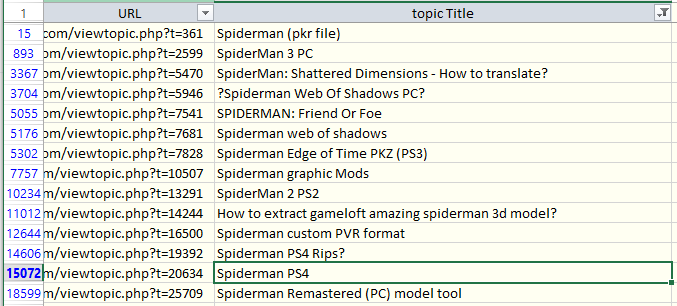
Here is a list of all (or almost all) Xentax topics archived by wayback machine. Find topic name with search or filter (see "spiderman" screenshot as example), then copy URL for the list, and open it.

There you can read the whole topic, with instructions and comments. But there will be no attached files. You can get attached files from archive.org - https://archive.org/details/xentax.7z in "attachments" folder. They are sorted by forum number and topic ID. So you have to look into corresponding forum folder (16 = 3d models in this example) and topic folder (20634 for spiderman PS4) - there you can find all files attached to that topic for each post (in there are many).

Edited by id-daemon


Game Name

All games

User Feedback

Create an account or sign in to leave a review

   2 of 2 members found this review helpful 2 / 2 members

The things are all from the archive back again.

   3 of 4 members found this review helpful 3 / 4 members

Thanking so much.

Account

Navigation

Search

Search

Configure browser push notifications

Chrome (Android)
  1. Tap the lock icon next to the address bar.
  2. Tap Permissions → Notifications.
  3. Adjust your preference.
Chrome (Desktop)
  1. Click the padlock icon in the address bar.
  2. Select Site settings.
  3. Find Notifications and adjust your preference.