





Skip to content
View in the app

A better way to browse. Learn more.

ResHax

A full-screen app on your home screen with push notifications, badges and more.

To install this app on iOS and iPadOS
  1. Tap the Share icon in Safari
  2. Scroll the menu and tap Add to Home Screen.
  3. Tap Add in the top-right corner.
To install this app on Android
  1. Tap the 3-dot menu (⋮) in the top-right corner of the browser.
  2. Tap Add to Home screen or Install app.
  3. Confirm by tapping Install.
Help us keep the site running.

ID-Daemon tools backup (zenhax / wayback machine) 1.0.0

(0 reviews)

1 Screenshot

Uploading all my tools will take a lot of time, so this is temporary solution.

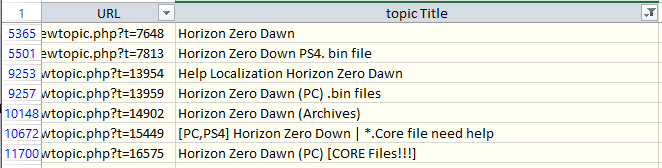
Most of my tools were released on zenhax, and now available with wayback machine. But how to find them? Here is a list of all topics from Zenhax archived by wayback machine, including attachments and inline scripts. Find topic name with search or filter (see "horizon zero" screenshot as example), then copy URL for the list, and open it.

This way you can download almost all of my tools. And also all tools/scripts published by others through the years.


Game Name

All games

User Feedback

Create an account or sign in to leave a review

There are no reviews to display.

Account

Navigation

Search

Search

Configure browser push notifications

Chrome (Android)
  1. Tap the lock icon next to the address bar.
  2. Tap Permissions → Notifications.
  3. Adjust your preference.
Chrome (Desktop)
  1. Click the padlock icon in the address bar.
  2. Select Site settings.
  3. Find Notifications and adjust your preference.

