





Skip to content
View in the app

A better way to browse. Learn more.

ResHax

A full-screen app on your home screen with push notifications, badges and more.

To install this app on iOS and iPadOS
  1. Tap the Share icon in Safari
  2. Scroll the menu and tap Add to Home Screen.
  3. Tap Add in the top-right corner.
To install this app on Android
  1. Tap the 3-dot menu (⋮) in the top-right corner of the browser.
  2. Tap Add to Home screen or Install app.
  3. Confirm by tapping Install.
Help us keep the site running.

Battlefield 6 tools 1.1

(20 reviews)

2 Screenshots

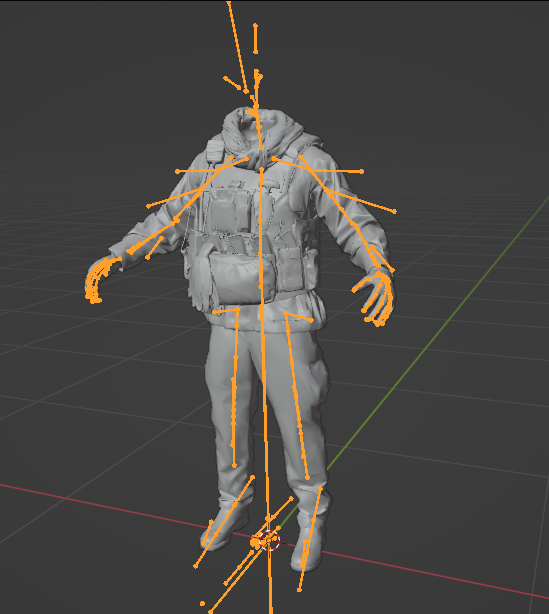
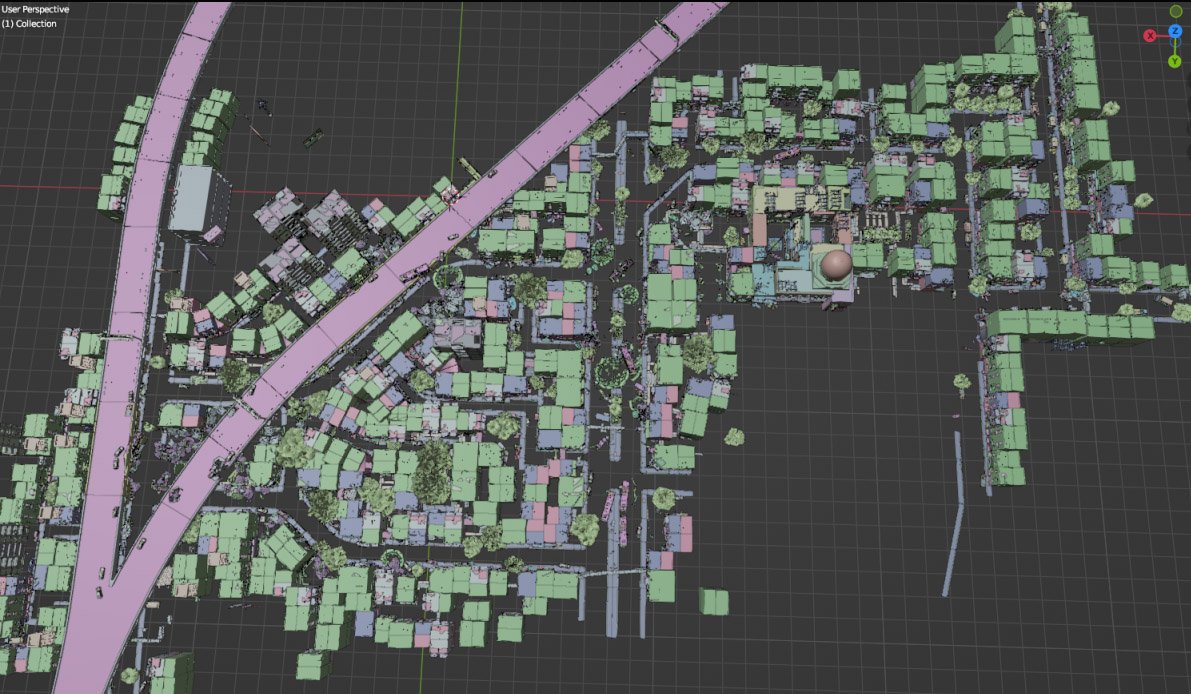
Tools for Battlefield 6. Currently supports dumping the game, export models/maps.
Usage is similar to previous tools for frostbite engine.

toc_bf6.exe - dump tool

Change .ini file parameters:
- game path
- dump path
- selection to dump "ebx", "res", "chunks" or "all"
Then drop any .toc file onto .exe to dump assets. Or run from command line with 1 parameter - toc file name.

Fb_bf6_mesh.exe - model tool

Takes .MeshSet as parameter.
ske_soldier_3p.ebx - main universal skeleton for soldiers. Must be in the same folder. If you need another skeleton, use its name as 2nd parameter. Or rename it to ske_soldier_3p.ebx.
Tool will try to find chunks automatically. If not, it gives error message with chunk name.

Map export

1. Create database

Run fb_maps_bf6_db.exe tool once, it will scan whole dump for meshsets and blueprints, so later maps can be converted fast, without the need to go into whole tree of assets. This will take a few minutes. After that, 2 files will be created: bp.db & meshnames.txt, which need to stay in the same folder with EXE for main tool to work.

2. Export maps

Use fb_maps_bf6.exe (main map tool) to convert maps. Drop any EBX on it, use in command line with 1 parameter, or create a batch.

3. Terrain export

Main terrain data is in .TerrainStreamingTree files for each level. For some levels, these files are small, which means the actual data is in chunks. Sometimes data is in the file itself, in this case it may be big, about 50mb in size.

Drop .TerrainStreamingTree on fb_terrain_bf6.exe or use command line.

Edited by id-daemon

What's New in Version 1.1

Released

- added support for physics bones

- added texture converter tool


Game Name

Battlefield 6

User Feedback

Create an account or sign in to leave a review


Hi,
fb_maps_bf6_db.exe crashes near the end with: Unhandled Exception: System.IO.EndOfStreamException: Unable to read beyond the end of the stream.

The tool processes hundreds of EBX entries before crashing, so it doesn't seem like a bad input file. It also fails to generate bp.db because of the crash.
Just wanted to report it. Thanks for the tools!

   1 of 2 members found this review helpful 1 / 2 members

为啥半天一直闪退呢?没有空格特殊符号中文路径,有没有视频教程呢

(edited)

   2 of 3 members found this review helpful 2 / 3 members

It would be great to share the source code so we can improve it and make it more stable . Its fine right now but not the way it need to be.   I mean it doesnt extract the ebx and res of envo.toc and it only extract the chunks which is useless without proper name . The audio is .sps and i already extracted them with my python script but that is useless too .

We need a dumper script and ebxtoasset script to get proper sound files 

Edited by rkthelegend

Response from the author:

I can confirm that this tool can work with UPDATE folder.

You just had to move files from update folder to data folder. Each subfolder inside "update" has "data" inside, and you have to move contents to main "data" folder. It does not overlap and work as intended, so you can extract any files from the game.

   1 of 2 members found this review helpful 1 / 2 members

Hi! Thanks for the utility!
Could you make it for the full version of the game?
A lot of content remains in the "Update" folder, and the utility can't unpack it.

Response from the author:

I can confirm that this tool can work with UPDATE folder.

You just had to move files from update folder to data folder. Each subfolder inside "update" has "data" inside, and you have to move contents to main "data" folder. It does not overlap and work as intended, so you can extract any files from the game.

   1 of 2 members found this review helpful 1 / 2 members

how to dump single-player level objects ,such as switchblade aavp7 6wheelapc

   1 of 2 members found this review helpful 1 / 2 members

Took a bit until I understood how to properly use it, but then it's really easy.

2 questions though:

1. Can anyone point me towards where I can find static vehicles which are used as props around the map(s)?

2. Has anyone had success in extracting hi-res textures? The models are great, but some of the normal textures are really small.

(edited)

   0 of 1 member found this review helpful 0 / 1 member

bf6.bmp

Thank you, I was very pleased and it works!

Edited by anubis1212

(edited)

   0 of 1 member found this review helpful 0 / 1 member

Hi,
I’ve successfully extracted the level data using your tool and currently have:

One transform file that contains the transforms (position / rotation / scale) for all assets in the level

One level FDM file, which I assume represents the level / map data

At this point, I’m not sure what the correct workflow is to:

Reconstruct the full scene layout

Export or import the complete level (including terrain) into Blender

So my questions are:

What is the intended way to reconstruct the scene from the FDM + transform data?

Is there a recommended export method (FBX / OBJ / custom script) to bring the full level into Blender?

Does the tool support terrain / heightmap extraction, or is the terrain stored separately?

Are there any helper scripts or example pipelines for importing the level into DCC tools like Blender?

Any guidance on the correct workflow would be greatly appreciated.
Thanks a lot for your work on this tool!


screenShot.png

Edited by Axiion

Response from the author:

To load exported map into blender, use this plugin https://github.com/REDxEYE/decima-dmf

Terrain exported by terrain tool must be loaded separately

nus

   2 of 3 members found this review helpful 2 / 3 members

fb_maps_bf6_db.exe
Change fb_maps.ini file parameters:
- \Dump\bundles path
- \Dump\chunks path

   0 of 1 member found this review helpful 0 / 1 member

Hi, Awesome too, really really good, im just working on Octane Shaders for the models, but im kinda lost on the textures, weapons have the CS,NMT,WO...

all 3 with alpha channels, but seems have too much channels and no bump, did u have any idea about it? i converted the NM to OpenGL and its fine, the Alpha seems be the Metallic too, but the WO and Alpha CS idk

   0 of 1 member found this review helpful 0 / 1 member

Hi, could you please upload a Windows x64 or .NET Framework 4.8 build of toc_bf6.exe? The current 19 KB version gives “This app can’t run on your PC” on Windows 10/11 x64. Thanks!

   3 of 4 members found this review helpful 3 / 4 members

this sounds great! but how can I import EBX files into blender? or, is there a tool to convert EBX into FBX?
I tried dropping EBX into the Fb_bf6_mesh.exe but all I get are two 0 KB .smd and .ascii files as somebody before me mentioned already.

many thanks for any help!

   0 of 2 members found this review helpful 0 / 2 members

perfect as always 🙂

(edited)

   1 of 2 members found this review helpful 1 / 2 members

why do 0 KB .smd and .ascii files appear when I move a .meshset file to fb_bf6_mesh? There are no errors. How can I fix this? Can someone send me the Brabley, Leopard and Abrams models?
And how I do export them to Blender? Can anyone tell me in detail what add-ons he uses and for what version?


Edited by usedm

   4 of 5 members found this review helpful 4 / 5 members

Will this tool be updated to work with the full release of the game? 


it partially works with the base game assets, but not the campaign or High quality texture dlcs

   1 of 2 members found this review helpful 1 / 2 members

First I want to begin with my appreciation to the skill, efforts and time spent to make this possible.
I still yet to have figured out how you import terrains and full maps.
My attempt was importing empire state and when i import the terrain it only gives me a collection with no meshes, completely blank.
Other than that, the tool is fantastic!

   1 of 2 members found this review helpful 1 / 2 members

For the life of me, i cant figure out what i'm doing wrong. I'm hoping soon someone can make a video or something explaining it but aside from that, it's awesome to see that there's at least a tool in the works for it!

   3 of 4 members found this review helpful 3 / 4 members

Hi id-daemon.
Thank you for always providing such interesting tools.

I'm not an English speaker, so I apologize if I'm being rude.

When I try to extract the vehicle model using the normal procedure, I seem to have a problem where the normal model and the destroyed model are combined.
Is there anything the user can do to fix this?
Or maybe I'm using the wrong skeleton...

2.png

1.png

Response from the author:

This is the way meshes are made in this game. Several damage states are in the same mesh. Theres way to split them, because states are weighted to separate bones, like bone 0, 1, 2 etc.

   1 of 3 members found this review helpful 1 / 3 members

Hi id-daemon, I have run your tool and it works fine on my computer for unpacking all.toc files. I haven't attempted to unpack the models yet, but there was a problem with the generation of the map database. After running fb_maps_bf6_db.exe, it only created a meshnames.txt file but did not create the bp.db file. I noticed that the tool threw an error. At first, I didn't pay attention to it, but when I continued with terrain reading, I noticed that all the building files were missing from my files. How should I proceed in order to be able to properly synthesize the complete map?

PixPin_2025-08-19_04-29-40.png

PixPin_2025-08-19_04-26-47.png

Response from the author:

Must be a problem with one of EBX files. I missed that because i didn't check them all yet.

Account

Navigation

Search

Search

Configure browser push notifications

Chrome (Android)
  1. Tap the lock icon next to the address bar.
  2. Tap Permissions → Notifications.
  3. Adjust your preference.
Chrome (Desktop)
  1. Click the padlock icon in the address bar.
  2. Select Site settings.
  3. Find Notifications and adjust your preference.

