





PAMFtool is an open-source muxer & demuxer for PlayStation Advanced Movie Format (.PAMF, .PAM), often found in PS3 games.
The goal of this project is to provide an open-source solution for preserving PAMF videos without relying on SDK tools.
Source code is included in the zip, the tool is still in development.
Supported streams:
- AVC (H.264) video streams
- M2V (MPEG-2) video streams
- ATRAC3 Plus audio streams
- LPCM audio streams
Requirements
Supported platforms: Windows, macOS, Linux.
Usage & Parameters
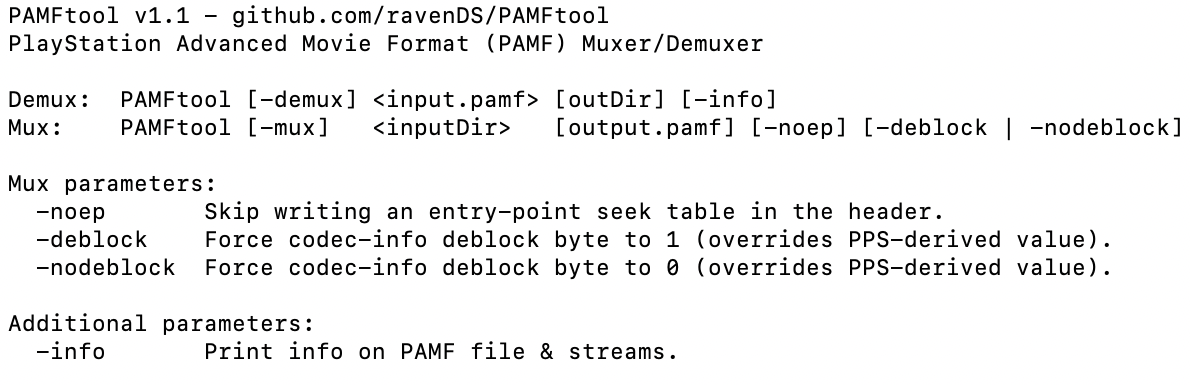
* -info - Print information about a PAMF file and its streams
* -demux - Demux all streams from an input PAMF file and write them to a subfolder
* -mux - Mux all streams contained in a folder into a new PAMF file
Additional -mux Parameters
* -noep - Skip writing an entry-point seek table in the PAMF header
* -deblock - Force the codec-info deblock byte to 1 for AVC streams
* -nodeblock - Force the codec-info deblock byte to 0 for AVC streams
Notes
- While the demuxer is fully functional, the muxer is still experimental. PAMF files rebuilt with this tool work in all tested PS3 games so far.
- Raw H.264 data does not play in most video players. Use ffmpeg to mux it back into a more conventional container format.
GitHub Repo

Create an account or sign in to leave a review
There are no reviews to display.