



Tools
Any complete tools can go here
1,799 files
-
Re-sort a (translated) text file to it's original order.
The starting point was to help translating Sniper Elite 4 and Zombie Army 4. In the other rebellion games the developers arranged the strings in order as they are spoken in the cutscenes, dialogues, but in these two games are not. My SniperRepacker tool needs the original order as they are in the asr files, otherwise after the import there will be a mess. Of course I could modify the tool, but I thought this feature can be used for other games too; and because I'm lazy 🙂. So I instead made this program for common usage. Below see the usage, and more below some detailed explanation, how and why it is useful.
Sorting based on StartPattern.
Usage: Resorter.exe "StartPattern" "RemainingPattern" "OriginalFile" "SortedFile"
StartPattern: usually the text id
RemainingPattern: the remaining text (the translation) after the text id
SortedFile: the sorted (and translated) text file
OriginalFile: the original sorted (not translated) text file
Target File: the re-sorted (and translated) text file to it's original order, name will be "[SortedFileName].resorted.[ext]"
Example:
Sniper Elite 4 txt one line: M02_RADIO_OPERATOR_DLG01_L03_GERGRNT01_01=I'm serious, man - radio it in!
Command line: Resorter.exe "^[^=]*=" ".*$" "M02_Marina.pc_en.txt" "M02_Marina.pc_en.sortedtranslated.txt"
FAQ:
If some lines missing from the sorted txt, those lines will be filled from the original file.
Empty lines in original file will be preserved in the resorted txt.
Lines in original file which do not match for the StartPattern, will be preserved in the resorted txt.
How this can be used?
For example, in Sniper Elite 4 M02_Marina.pc_en contain strings in order as this:
M02_TWO_GRUNTS_WITH_WHEELBARROW_DLG01_L05_GERGRNT01_01=Bound to smell a bit, I guess. Who knows how long it's been in the sea?
M02_IGD1A_L02_KARL_01_ALT=A lot of brave men died on the Orchidea –
M02_IGD1A_L02_KARL_02_ALT= we need to make sure their sacrifice was worth it.
M02_NEAR_VILLAGE_SQUARE_DLG01_L01_GERGRNT01_01=People here think Böhm is the devil.
M02_IGD1A_L09_WEAVER_01=The leader is a woman by the name of Sofia di Rocco.
The capitalized characters with underscore until the equal sign is a text id, afterwards the actual string.
There is some ordering, but mostly a mess. If I open the exported txt in Notepad++ and use Edit, Line operations, Sort lines as abc, this will be the result:
M02_KARLTOSELF_SEE_BRIT_OFFICER_BODY_ON_BEACH_01=A British officer..?!
M02_NEAR_VILLAGE_SQUARE_DLG01_L01_GERGRNT01_01=People here think Böhm is the devil.
M02_NEAR_VILLAGE_SQUARE_DLG01_L02_GERGRNT02_01=And what do you think?
M02_NEAR_VILLAGE_SQUARE_DLG01_L03_GERGRNT01_01=I'm just a soldier. I don't think about those things.
M02_NEAR_VILLAGE_SQUARE_DLG01_L04_GERGRNT02_01=Sure. Me neither.
As you can see, M02_NEAR_VILLAGE_SQUARE_DLG01_xxxx is a dialogue, right now in the right order, much easier to translate and well translate. However as I said, my tool can't import this arranged txt. And here comes the resorter!
So, you will need the original txt file, and the sorted-translated txt file. Give them to the resorter, and it will make a new txt, now with the translations, but with the original order! Aaaand because I wanted to make this to usable in common as possible, you will need some understanding of regular expressions. But do not fear of them, much easier than you think at first. I usually use https://regex101.com/ to create regex, it is highlight what the patterns cover, so much easier than just thinking about with books and tutorials.
For example the below command line can be used for the above file. You can copy the text and the regex for regex101.com to see how regular exp. works. Also this can be used for other game files wich uses the same line structure.
Resorter.exe "^[^=]*=" ".*$" "M02_Marina.pc_en.txt" "M02_Marina.pc_en.sortedtranslated.txt"
^[^=]*= is the start pattern, this covers the text id (^ is line start, [^=] is a character which not equal sign, * is a modifier for the previous char, means zero or more times [^=], = is just equal sign)
.*$ is covers the rest until the line end (. is any character, * is zero or more times the previous char, $ is line end)
The other two parameters are the original and the sorted-translated text files.
- 39 Downloads
Submitted -
[General]:
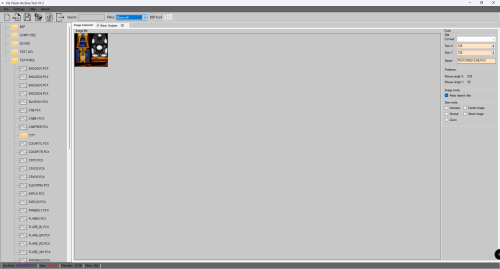
This tool was designed for the archive files that was created by Interactive Vision.
With my tool you can read, extract the content of these archive types, and of course
build them! You can also open the archives to display images in the Image Inspector,
and to display the script files in the IA Vision Scripter.
[Scripts and images]:
My program can edit convert and export the *.pcx images stored in the archives. To display the
content of a script file (*.ini || *.xml || *.txt) or display an image, you do not need to extract the
content of the archives. Supported image formats: (*.pcx || *.png || *.bmp || *.tga).
[Sound files]:
You can also play the audio files (.wav || *.ogg) stored inside the archives with out any extraction.
[Filelist generator]:
You can generate a list of files that was loaded from the archive, and you can export it to see
whether something is missing. It can be useful, if you create or update an archive to see what can
be missing...
[Archive creator]:
This program has a very powerful easy to use archive creator with you can create your
container file fast! Supported formats (*.bin || *.dat || *.htc).
// Installation
To install the tool, please execute the IA Vision Tool.exe file.
// List of supported games. (In this version)
+ Bhunter A.kA. Bounty hunter (full version, Alpha, Beta version)
+ Beyond Pearl Harbor: Pacific Warriors
+ To Serve and Command
// Knowing issues
* There is a *.bsp archive-related issue that causes that we still can not extract the content of the version 2. of the *.bsp archives.
More technical information is needed to update my tool.
IMPORTANT
This tool works well, but I need to implement functions for other games, especially for To Serve and Command game.
For more information, please visit my website: www.theoutforce.hu
- 14 Downloads
Submitted -
ntcompressHelper is a small program that automates the extraction of compressed files with ntcompress.exe by making a batch file.
For Easiest Use: Place the program in the same folder as the .lz files you want to decompress. The folder dialog defaults to the application path itself.
- 14 Downloads
Submitted -
fcp_unpack.exe - unpack .fat/.dat pairs.
Drop .fat onto the tool. It will unpack all files. It will search all .XML files located in the same dir for names.
Names for all files in big primal_main package is here - https://mega.nz/#!IZYlBSKJ!gjrLniO4goeCFlSoQQk_PqhLEGcxW0dd7nH2QqOVcfs
You can go to current dir, and run the tool from somewhere else and specify FAT file somewhere else. So you can place everything in 3 different dirs if you like:
1. dir with the tool
2. dir with fat/dat pair
3. current dir where unpacked files will go (also must have xml files for names)
fcp_pack.exe - repack .fat/.dat pairs.
Just run it in the dir where you have files to pack.
oasis_fcp - modified "dunia tools" strings converter for Far Cry Primal
1. Convert BIN to XML as usual
2. Find line with 0xAEE923DE code and delete it. (This new format somehow has 1 section without lines in it. This is causing the old tool to fail. Maybe it's needed or something, then I'll have to find a way to handle it.)
3. Make changes you need
4. Convert file back to BIN
5. Add "table_fcp" table to the end of the file (This can be done in any hex editor or commander tool, or with command line such as "copy /b oasis.bin + table_fcp oasiswithtable.bin")
6. Pack oasis file into FAT/DAT with my packer tool.
Important note. Patch.fat/dat is loaded before patch_sound.fat/dat so you have to find some other package to replace text, or remove old file from patch. I did this by finding the file hash in patch.fat and changing it. The hash is (F3 F8 E3 5D 29 FD BD F2) for english file. Changing any byte here will "mask" the file so game won't find it. Also if oasis file will be changed, you need to get the new table from the end of original file.
oasis_fc4 - strings converter for Far Cry 4
Same for FC4
- 181 Downloads
Updated -
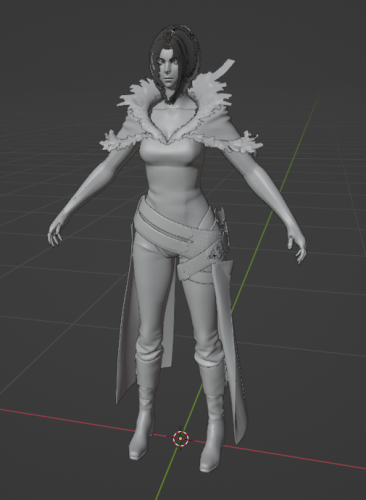
Tool for FFXVI (Final Fantasy 16) models.
So far it must support all (or almost all) models from "chara" folder. Static map parts may also work. Did not test much of the others.
Requires 1 or 2 parameters. Usage:
FF16.exe <mdl> <pac> 2nd parameter is needed for skeletons. If you don't provide .PAC file, model will be exported as static mesh. The PAC file for character group is in its corresponding "pack" folder.
- 455 Downloads
Submitted -
- 42 Downloads
Submitted -
Console-Swizzler is a cli tool to swizzle DDS textures for console games.
run tool without args to see its usage.
made by matyamod (compiled by me)
source:
https://github.com/matyamod/Console-Swizzler
- 74 Downloads
Submitted -
m0xf's tool for SDF archive extraction. The tool only extracts - does not import. Originally posted on XenTax by the author.
Open in command line.
Usage: rouge_sdf.exe <sdftoc file> <output folder>
Example: rouge_sdf.exe "C:\Game\sdf.sdftoc" "C:\Game Export\extracted"
- 180 Downloads
Submitted -
texconv is a utility for creating textures for the SEGA Dreamcast hardware.
Requires Qt 5.2 or newer.
Supports all image formats supported by Qt.
At the time I'm writing this, these formats are supported:
Format Description Qt's support
BMP Windows Bitmap Read/write
GIF Graphic Interchange Format (optional) Read
JPG Joint Photographic Experts Group Read/write
JPEG Joint Photographic Experts Group Read/write
PNG Portable Network Graphics Read/write
PBM Portable Bitmap Read
PGM Portable Graymap Read
PPM Portable Pixmap Read/write
XBM X11 Bitmap Read/write
XPM X11 Pixmap Read/write
USAGE
=====
texconv --in <filename> --out <filename> --format <pixelformat> [flags...]
EXAMPLES
========
texconv --in img.jpg --out a.tex --format RGB565
Creates an RGB565 texture called 'a.tex' using 'img.jpg' as input.
texconv --in img.jpg --out a.tex --format PAL8BPP
Creates an 8-bit paletted texture called 'a.tex' using 'img.jpg' as input.
A palette file 'a.tex.pal' will also be created.
texconv --in img.jpg --out a.tex --format YUV422 --compress --mipmap
Creates a compressed, mipmapped YUV texture 'a.tex' using 'img.jpg' as
input.
texconv --in img1.jpg --in img2.png --format RGB565 --mipmap
Also assuming "img1.jpg" is 64x64 and 'img2.png' is 16x16, creates a
mipmapped RGB565 texture with mipmap levels like this:
64x64 - 'img1.jpg'
32x32 - 'img1.jpg' (downscaled)
16x16 - 'img2.png'
8x8 - 'img2.png' (downscaled)
4x4 - 'img2.png' (downscaled)
2x2 - 'img2.png' (downscaled)
1x1 - 'img2.png' (downscaled)
texconv --in img.jpg --out a.tex --format PAL4BPP --compress
--preview preview.png --vqcodeusage usage.png
Creates a compressed 4-bit paletted texture 'a.tex' using 'img.jpg' as
input. A palette file 'a.tex.pal' will also be created. A preview file
'preview.png' showing what the texture looks is generated as well as
an image 'usage.png' that visualizes codebook usage for 'a.tex'.
- 24 Downloads
Submitted -
An addon for Blender that supports import and export operations for .SkinnedMesh, .SkinnedAnim and .Skeleton files. Drag and drop importations are also supported, even for multiple files of the same type.
Meshes to be exported are limited to 65536 vertices, 1 uv map and 1 texture to go along with it. Even stationary objects in the game have a simple skeleton, so it's safe to say that even the simplest object should be exported while being bind to a skeleton. The mesh's textures are not exported by this addon and should be placed manually within xml and zip/folders to work.
Skeletons are limited to 256 bones, should have a bone named "Head"(case-sensitive) and at least one bone named either "base" or "root", both of which are case-insensitive. Not having the "Head" bone causes the game to crash in some cases as it is responsible for the positioning of entity dialog.
There are also three helper operators that can be called from the search menu on Blender: "Check If Armature Is Valid", "Retarget meshes weights to skeleton" and "Rebuild Bone IDs for Armature".
Check if the armature is valid is useful to see if there are any necessary adjustments to be made on the armature for it to be valid for either importation(useful when importing other things that use the armatures, such as skinned meshes) or exportation.
When importing meshes without a valid skeleton, their weights are assigned to vertex groups with bone ids as their name. By selecting one or more meshes and a single armature, retargeting the meshes' weights will rename each vertex group on the meshes to their respective bone in the target armature.
Rebuild bone ids for armature will work as long as a root/base bone is present. It rebuilds invalid bone_id properties on the armature and is necessary to set up new armatures or fix broken ones.
Animations to be exported should have no problems as long as it's target armature is valid. If the "Export all actions in armatures" is not checked, then the currently selected action in the action editor will be exported. Different animations should be organized in different actions.
There are explicit options for choosing whether to export only selected objects now.
There is also a new option to only consider deformation bones. This is useful when exporting rigged armatures so that only bones that are responsible for deformation(and are obligatory bones, such as the root/base and Head bones) are exported, reducing the risk of the armature running over the 256 bone limit. To work with deformation bones one has to rebuild the bone id properties of the whole armature before doing other operations by using the respective operator while having "Consider only deform bones (Recommended)" turned on.
The addon was made for Blender 4.1.0 and probably won't work on earlier versions due to the new drag and drop functionality that Blender added recently. You can try to delete the drag and drop related code and correctly assign the specular value to the correct BSDF shader node on earlier versions and it might just work.
I've created a github repo to help in versioning and keeping track of bug fixes, the download is also there on the releases page:
Link
Or you can download it directly from here.
- 22 Downloads
Updated -
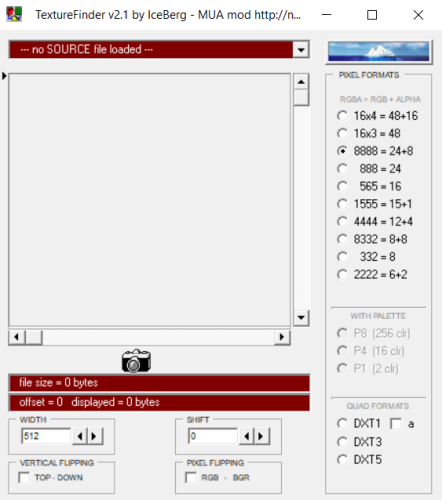
Texture Finder is a tool made by IceBerg to find texture files.
You use the tool by loading in an unknown image file format and then use the pixel formats, with pallete, quad formats along with offsets in the program to finalize the image and converting it into .bmp when exporting. Sadly no further documentation is included with the program thus far.
- 2,410 Downloads
Updated -
Hello, guys!
It's me again! I haven't posted anything for a while, so I decided to make a new program for my tool I created for the game.
It's a NET windows forms application program, that was tested multiple times.
This is version 1.1 with some fixes and basic features. (see the attached images). This program is part of a bigger project, the "DevTools" that I designed for the game. You can also download that tool (version 2.7). I'm working on version 2.8. This tool will be updated with the v2.8 of DevTools...
With this tool you can open any *.box archives, watch *.bik files or listen to *.mp3 files stored in the box archives. You do not need to extract anything, also do not need to create temporary folders.
For more info, please read the attached Changelog.txt file...
This tool will be updated multiple times!
- 8 Downloads
Updated -
KobaltBuilder V1.0 Console
With this console line application, you can extract the *.npk file or create it that the Project Nomad
game engine can handle.
Functions:
Type "Extract" to extract the content of *.npk archives or "Create" to create such an archive. To create
*.npk archive put the files in the ToCreate folder. (You need to create this folder!)
1.) ShowFiles: This command will list all the files found in the npk archive
2.) Extract: This will extract you the selected file. The files will be placed in a folder that the
program will creates automatically.
3.) ExtractArchive: This command will extract the entire archive. The files will be placed in a folder that the
program will creates automatically.
This program will be updated soon! In addition, I started to working on the GUI version with more features!
- 25 Downloads
Updated -
Tool to unpack/repack braid.dat archive of the Braid Anniversary Edition.
Usage :
unpack: -u archive_name
repack: -r archive name compression_level
When repacking, optionally you can specify compression level, legit values are from -4(fastest) to 9(slowest). Default value is 6(devs used it), but it's pretty slow, very slow I would say, so I decided to add this option at least for the testing purposes.
- 103 Downloads
Updated -
Can be used via GUI or CLI.
If your antivirus detects exe/zip files as viruses, it's just a false positive. I don't know why every time I compile a .py to .exe using Nuitka, it always gets detected as a virus.
- 67 Downloads
Updated -
The Order 1886
Post by daemon1 » Sat Jul 10, 2021 10:59 am
Map tool.
I had no time to make a universal tool for both skeletal and static meshes, so i made a separate map tool.
I had to switch off physics for map tool, so skeletal meshes exported may be incomplete or broken. Use old skeletal tool in this case.
Usage:
Model assets are in 3861c21fc34b7612 folder, raw data files for them are in GPU folder.
For maps, you will also need external texture streams, which is 4c7002f42ce0da08 folder.
1. rename folder with external texture streams to just "streams" and place it next to the tool.
2. rename files from GPU folder to *.RAW
3. place corresponding asset and .RAW files in the same folder
4. drag any of them (asset or .RAW) onto the tool (or use batch/command files)
About 220 of all asset packages contain maps. For them, tool will export these files:
- ascii file with base meshes (including skeletal parts)
- smd file with base meshes (including skeletal parts)
- ascii file with instanced meshes, if present (level props and other repeating things)
- layout files with a list of all shaders (debug output, you dont need it)
- material files with a list of all textures used in each mesh and their types
- all textures used in a map will be exported to "textures" subfolder, so it will hold all textures for all maps in one place
ASCII files will have 2 main texture types auto-assigned (main diffuse & main normal)
After that you can use included blender plugin made by SecaProject to load the map.
- 19 Downloads
Submitted -
The Order 1886
Post by daemon1 » Thu Jul 29, 2021 5:06 am
New version for maps tool:
- fixed a few very rare meshes with 65k+ vertices
- added support for texture type 12
- smd export removed
- blender script small fixes
- 22 Downloads
Submitted -
The Order 1886
Post by daemon1 » Wed Jun 20, 2018 10:24 am
The Order 1886 tool
This tool works for skinned meshes: characters, weapons etc. For map tool - look below.
Usage:
Game files have no proper names. Model assets are in 3861c21fc34b7612 folder, raw data files for them (for those which have it, including models) are in GPU folder. Since asset & raw file is called the same, you have to do the following:
1. rename files from GPU folder to *.RAW
2. place corresponding files (or all files) in the same folder
3. drag any of them onto the tool (or use batch/command files)
Notes:
- oodle dll will be needed for the tool to work (usually called oo2core_5_win64.dll or so)
- some rare bones may have scales, and may not work properly
- physics engine is complex, so some cloth parts may not work properly
- 42 Downloads
Submitted -
Spiderman 2 (PS5) tool. Models & textures (most of them) supported now
Correct INI file for the folder where you have game data files. Be sure that folder name has 'PS5' in its name.
Then run some of these commands:
1. spiderman2 99807473A3981A8D - will extract that asset
2. spiderman2 99807473A3981A8D c:\spider\iw - will extract asset into folder with name you specified
3. spiderman2 list.txt - will extract ALL assets in list
asset lists you can find in discord
you can also edit "list.txt" to give assets any names/folders/drives you want
tool will work based on HASHES (not names), names are given for reference
- 978 Downloads
Updated -
For unpacking the pack[0-9].pac by using the suzaku file index.
Start with using suzaku.bms on the WIN\JP\suzaku.fnd file.
Export to a directory NOT within the WIN\JP folder.
This will unpack and unzip everything including the English language audio and texture files (previously unfound).
Texture .dds files can be opened with Noesis. Chr model bin files can be opened in the UniViewer_U2 or FFT0Anim_U1.
Audio .scd files can be played in FooBar2000 with the vgmstream plugin (not included).
The file packing system is a little messy so multiples of the same files can sometimes be found.
Because of this, allow QuickBMS to rename files when unpacking and not overwrite them.
Also inculded are 5 other scripts for unpacking other types of files.
- textures.bms
For JP\system\sugimoto\ textures.bin / weathertex.bin files.
- se_pac.bms
For JP\sound\sepack files.
- hfm.bms
For files with the hfm\x00 magics. Can sometimes leave data behind but should get most of the files packed.
- subtitle_pac.bms
For JP\movie\subtitle files.
- menu_pac.bms
For JP\menu\main\dat files, JP\__\savedata\for_show\GAMEDATA00\ TYPE0DAT.BIN / TYPE0SYS.BIN files. Might be useful on others but didn't check everything.
Also included is a 010 template of the game models by Echelo. And a decryptor by AyuanX for some files.
- 136 Downloads
Updated -
These are the tools used to extract models and other assets from the Marvel's Avengers video game that released back in 2020.
TigerDecrypt_v2_8_2_0 (Caution: Trojan software)
TigerDecrypt_v2_8_2_0.rar
MA.Tiger.Unpacker_0.0.3.1637
MA.Tiger.Unpacker_0.0.3.1637.rar
MA.DRM.Dumper_0.0.3.1622
MA.DRM.Dumper_0.0.3.1622.rar
To clarify, the TigerDecrypt uses Trojen tools to break encryptions which allows you to pull the assets from those Tiger files. Your anti-malware software will notify you to delete the file from your computer to avoid possible corruption to your computer. Use these tools at your own risk and understand the dangers to possibly exposing yourself to hackers. If you're understanding network security, you have anti-virus software enabled, and you know how to dig into your computer with registry or CMD, then you'll be safer to handle these situations since you're well educated on the risks and what to look out for.
HUGE thanks to the community of beautiful people who made these tools and gave guidance to extracting from this game. The main objective is to acquire all the MCU character models.
Ekey: https://github.com/Ekey/CDCE.TIGER.Tool?tab=readme-ov-file
Gh0stBlade: https://github.com/Gh0stBlade
Crazy31139: https://www.deviantart.com/crazy31139
Eric945: https://reshax.com/profile/189-erik945/
- 86 Downloads
Submitted -
Koei Tecmo .g1n font format editor. Made by lehieu68.
Github Repository
Tutorial
- 29 Downloads
Submitted -
Usage is the same as PS4/PS5 tool, but you dont need oodle dll anymore.
Change patch in .ini file, then run tool with asset package code. Example:
h2_extr_pc.exe E264- 401 Downloads
Submitted -
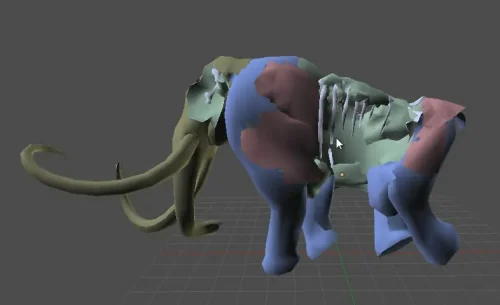
This automates part of the extraction of model files from Arc Rise Fantasia. It is made with Visual C#.
- 9 Downloads
Submitted